
Executive Summary
In the realm of facility management and industrial engineering, communicating the versatility of precision tools can often result in dry, purely technical content. The client approached Advids with a vision to disrupt this norm. They required an Advanced Architectural Simulation Video that would not only demonstrate the technical specifications of their "RS Pro" product line but also humanize the brand. Advids engineered a high-fidelity 3D narrative featuring a robotic protagonist, blending photorealistic architectural environments with accurate sensor data visualization to create a compelling product demonstration.
The Challenge: Bridging Technical Utility and Narrative Engagement
The primary challenge lay in the duality of the objective. The video needed to serve as a rigorous technical demonstration of various tools—multimeters, air quality monitors, thermal imaging cameras—while simultaneously telling an engaging story through a stylized character. The client faced the "Integration Paradox":
- Technical Accuracy: The architectural settings (solar roofs, server rooms) and tool readings needed to be physically accurate simulations.
- Character Stylization: The protagonist was a stylized robot, requiring a delicate visual balance to ensure it didn't look out of place in a photorealistic world.
- Data Visualization: Invisible metrics like heat and voltage needed to be visualized without cluttering the scene or obscuring the product geometry.
The Solution: The Advids Precision Visualization Workflow
Advids deployed a customized 3D Industrial and Technical Animation module. By treating the project as a simulation of a "day in the life" of a facility manager (represented by the robot), we grounded the narrative in reality. We utilized Physically Based Rendering to ensure materials reacted to light realistically, and integrated complex particle and shader simulations to visualize the data captured by the tools. This approach transformed abstract specifications into tangible, visual evidence of performance.
Client Profile & Objective
- Client Industry: Industrial Components & Engineering Tools.
- Core Objective: To showcase the breadth and application of the RS Pro tool range across diverse facility environments (Energy, HVAC, IT Infrastructure) through a cohesive, animated narrative.
- Target Audience: Facility Managers, Engineers, and Procurement Officers.
The Advids Precision Visualization Workflow
This project was executed using a specialized high-end 3D pipeline designed for accuracy and visual fidelity.
Project at a Glance
| Category | Details |
|---|---|
| Video Type | Advanced Architectural Simulation Video |
| Production Timeline | 9 Weeks |
| Primary Visual Style | Photorealistic 3D Animation with Character Integration |
| Communication Stack | Slack (Daily Operations), Google Drive (Asset Management), Vimeo Review (Frame-accurate Feedback) |
| Core Technology | Maxon Cinema 4D, Redshift (GPU Rendering), Adobe After Effects |
Production Timeline: From Concept to Simulation
The project followed a rigorous critical path to ensure all milestones were met with precision.
- Week 1: Discovery & Script Analysis: Deconstructing the tool specifications and defining the "Robot's Journey."
- Week 2: Storyboarding & Animatics: Developing
Animatic_Seq_01_V2.mp4to lock in camera angles and timing. - Week 3: Asset Creation (Modeling): Detailed modeling of the Solar Roof, Office Lobby, and Server Room assets.
- Week 4: Character Rigging: Finalizing the mechanical rig for
Robot_Mascot_Main_V4.c4d, including drone transformation mechanics. - Week 5: Look Development: Applying Physically Based Rendering textures to ensure the robot's plastic casing contrasted correctly with industrial metals.
- Week 6: Technical Animation: Keyframing the character interactions and tool deployments.
- Week 7: Simulation & Visual Effects: Developing the thermal camera shaders and air quality particle systems.
- Week 8: Lighting & Rendering: Executing the final render passes (
Lighting_Pass_ServerRoom_V3.exr). - Week 9: Compositing & Sound Design: Final color grading and integration of digital user interface elements.
Production Deep Dive: Constructing the Simulation
Phase 1: Architectural Environment Construction
Goal: To create three distinct, photorealistic environments that would serve as the testing grounds for the tools.
Process: The Advids team utilized architectural blueprints to model the solar rooftop, the modern office interior, and the industrial server room. We focused heavily on "Tessellation" to ensure the surfaces (corrugated metal on the roof, brushed steel in the server room) held up under close-up camera angles.
Action: We generated Env_SolarRoof_Geo_V03.obj and Env_ServerRoom_Assembly_V2.fbx. Special attention was paid to the lighting setup in the server room to create dramatic reflections on the motor casings, highlighting the industrial context.
Phase 2: Breathing Life into Mechanical Assets
Goal: To animate the "RS Pro" robot with personality while maintaining mechanical plausibility.
Process: The robot required a complex "Rig" that allowed for two distinct modes: a tread-based ground mode and a propeller-based flight mode. The transition between these states had to feel mechanically sound, not magical.
Action: Our animators focused on "Ease-In" and "Ease-Out" curves to give weight to the robot's movements.
Feedback Loop: Refining the Character Performance
- Client Feedback: "The transition to drone mode feels too instant. We need to see the weight of the engines engaging before lift-off."
- Advids Response: We adjusted the animation curves in
Animation_Take_04_DroneLaunch.c4dto include a momentary "anticipation" settle before the propellers spun up to full speed, adding physical realism to the movement.
Phase 3: Visualizing Invisible Data (The Simulation Layer)
Goal: To accurately represent the data readings of the tools within the 3D space.
Process: This involved creating "Heads-Up Display" elements that tracked with the camera. For the air quality monitor, we used a particle simulation to visually represent airflow entering the device. For the multimeter, the digital readout was composited to match the lighting of the scene.
Action: We utilized vector assets created in illustration software (UI_Multimeter_Readout_Assets.ai) and composited them onto the 3D render with a "Screen" blending mode to simulate a digital LCD glow.
Critical Juncture: The Thermal Imaging Challenge
The Constraint: In the server room sequence (00:55), the script called for a POV (Point of View) shot from the Thermal Camera showing an overheated motor. However, applying a standard thermal color ramp to the 3D model resulted in a flat, abstract image where the geometry of the motor was lost. The viewer could see the heat, but not the object being measured.
The Research & Development: The Advids technical team needed a solution that preserved the structural detail of the motor while applying the heat map data. We experimented with Thermal_Shader_Pass_02.exr but found it lacked definition.
The Solution: We developed a custom "Fresnel-based" shader network. This technique used the angle of the surface relative to the camera to drive the opacity of the thermal gradient.
- Layer 1: A wireframe pass to define the edges of the motor.
- Layer 2: The thermal gradient mapped to specific "hotspots" on the geometry.
- Layer 3: A fresnel overlay to highlight the contours.
This resulted in a composite that clearly showed what was overheating, satisfying both the narrative need for clarity and the technical need for accuracy.
Visual Asset Highlights
| Serial No. | Visual Asset | Timestamp | Rationale | Placement |
|---|---|---|---|---|
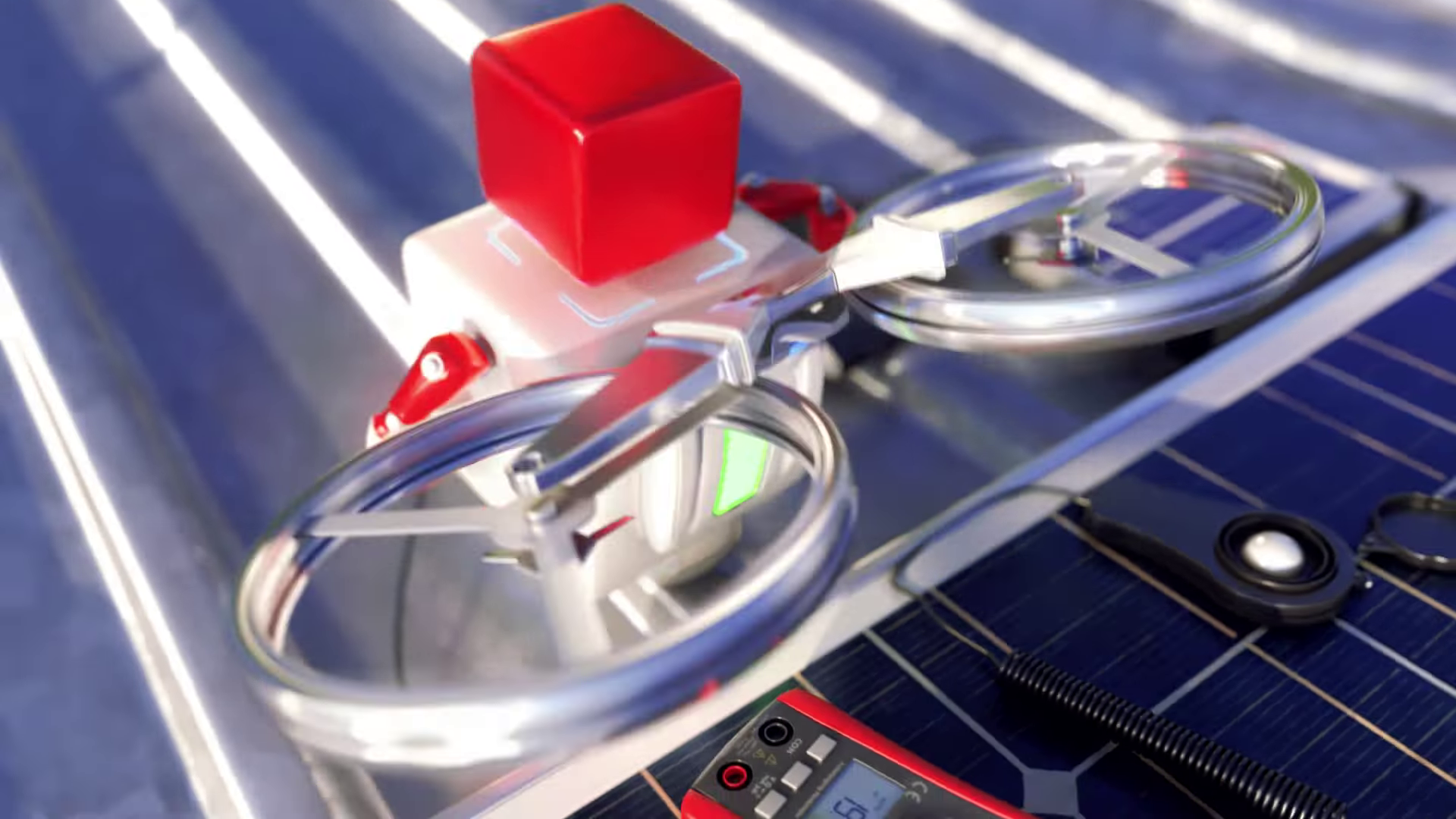
| 01 | IMG ASSET 1 | 00:03 | The Solar Inspection: Demonstrates the seamless integration of the 3D character with the solar panel asset and the multimeter tool. | Production Deep Dive |
| 02 | IMG ASSET 2 | 00:16 | The Transformation: Showcases the complex mechanical rigging and animation as the robot deploys drone propellers for aerial tasks. | Production Deep Dive |
| 03 | IMG ASSET 3 | 00:56 | The Thermal Simulation: Visual proof of the Critical Juncture solution—the thermal POV that retains geometric detail. | Critical Juncture |
| 04 | IMG ASSET 4 | 01:16 | The Charging Cycle: The final shot showing the branded charging station, reinforcing the ecosystem of the product line. | Outcomes |
Synergy Analysis: Technology Meets Artistry
This project exemplified the synergy between robust Computer-Aided Design data handling and creative storytelling.
- Technology: We leveraged high-performance GPU rendering (Redshift) to calculate complex light bounces and reflections in the server room and office scenes, ensuring the "simulation" aspect felt physically grounded.
- Human Expertise: The "soul" of the video came from our character animators who infused the robot with curiosity and diligence, turning a standard product demo into a relatable narrative.
Outcomes and Strategic Learnings
The final video was successfully deployed across the client's digital channels and trade show screens.
- Strategic Outcome: The video successfully positioned the RS Pro line as a comprehensive, high-tech solution for modern facility management.
- Production Learning: The success of the "Fresnel-based" thermal shader has established a new internal standard at Advids for visualizing heat maps on 3D geometry, which will streamline future industrial simulation projects.
Would you like me to develop a detailed technical breakdown of the "Fresnel-based shader" node setup used in the Critical Juncture section?
Final Video
Author & Editor Bio

