Summary
This case study examines the production of a hybrid-media explainer video for the software-as-a-service platform, Process Street. The project's core challenge was to make an abstract digital product—process management—feel simple, tangible, and human-centric. Advids achieved this by executing a "Conceptual Pivot," shifting from a traditional 2D explainer to a sophisticated hybrid model. This approach combined the client's high-quality, sourced live-action footage with fluid, brand-aligned 2D motion graphics, all driven by the Advids Clarity & Engagement Framework over a seven-week production timeline.
The Challenge
Process Street offers a powerful, flexible platform for managing business workflows. The challenge was to communicate this power without overwhelming a new user. A simple software tutorial would be too dry, while a purely abstract animation would fail to show the software's concrete benefits. The video needed to bridge the gap between human collaboration and digital efficiency, making "workflow" feel like a clear, satisfying, and collaborative experience.
The Solution
Advids proposed and executed a hybrid-media strategy. We leveraged the client's library of professionally shot, minimalist live-action footage to provide a human, relatable context. Then, our 2D animation team designed and animated the entire Process Street user interface and conceptual diagrams as vector assets. These animated elements were
seamlessly composited into the live-action scenes, creating a single, cohesive visual world where the digital product clearly interacts with the human user.
Client Profile
Process Street (Process.st) is a leading Software-as-a-Service (SaaS) provider that helps teams create, manage, and automate their recurring checklists, processes, and workflows. Their platform is used by businesses worldwide to improve efficiency, reduce errors, and scale operations.
Project Objective
To create a high-impact "hero" explainer video that clearly demonstrates the simplicity and power of the Process Street platform. The video needed to serve as a primary marketing tool to drive user understanding and adoption by visualizing the platform's key features, from simple checklists to complex, multi-departmental workflows.
The Advids Clarity & Engagement Framework
For this project, Advids employed its specialized framework for 2D motion graphics. The focus was on absolute clarity, seamless integration, and strict adherence to the client's brand identity. This involved meticulous Keyframe Animation to ensure all motion felt intuitive and fluid, and a deep strategic focus on how to best hybridize 2D animation with client-sourced live-action footage.
Project at a Glance
| Feature | Detail |
|---|---|
| Client | Process Street (Process.st) |
| Agency Partner | Advids |
| Project | Hybrid 2D Software Explainer Video |
| Video Type | 2D Motion Graphics/Explainer (Hybrid) |
| Estimated Duration | 7 Weeks |
| Core Technologies | Vector Illustration Software (Adobe Illustrator), 2D Animation Suite (Adobe After Effects), Audio Editing Software |
| Collaboration Stack | Slack (Real-time Communication), Google Drive (Asset Management), Vimeo Review (Video Feedback) |
| Final Deliverables | 1080p Hero Explainer Video (0:30), 1:1 Social Media Edits |
Project Timeline
- Kickoff & The Conceptual Pivot (Week 1)
- Milestone: Initial strategy call and script analysis.
- Key Outputs: Script_Final_V4.docx. Decision made to pursue a hybrid-media strategy using client-sourced live footage.
- Visual Strategy & Storyboarding (Week 2)
- Milestone: Approval of visual direction.
- Key Outputs: Storyboard_Hybrid_V2.pdf (detailing all 2D-over-live-action shots), Style_Frames_Set_C_V3.png.
- Quote: "The hybrid storyboards look fantastic. This is exactly the 'human-centric' feel we were missing."
- Asset Creation (Week 3)
- Milestone: All digital assets created and approved.
- Key Outputs: UI_Assets.ai (a complete vector library of the Process Street user interface).
- Animatic & Initial Animation (Week 4)
- Milestone: Timing and flow locked.
- Key Outputs: Animatic_V2_with_live_plates.mp4 uploaded to Vimeo Review.
- Quote: "The client's live footage is great, but the lighting varies. We'll need to add subtle glows and gradients to our 2D elements to make them sit in the scenes."
- Full Animation & Revisions (Week 5-6)
- Milestone: Detailed Keyframe Animation and compositing.
- Key Outputs: Version 1 of the full animation. Feedback loops executed.
- Sound Design & Mastering (Week 7)
- Milestone: Final polish.
- Key Outputs: Voice-over, music, and sound effects integrated and mixed.
- Final Delivery (Week 7)
- Milestone: Final project files delivered.
The Production Deep Dive: From Script to Seamless Hybrid Animation
Phase 1: The Conceptual Pivot: Designing a Hybrid-Media Strategy
Goal: To establish a unique visual strategy that solved the client's "human-centric" challenge.
Process: The project began with a deep script analysis. The script was strong, but the Advids team identified that a 100% animated video might feel too "digital" and disconnected. The challenge was to ground the abstract software in a real-world context.
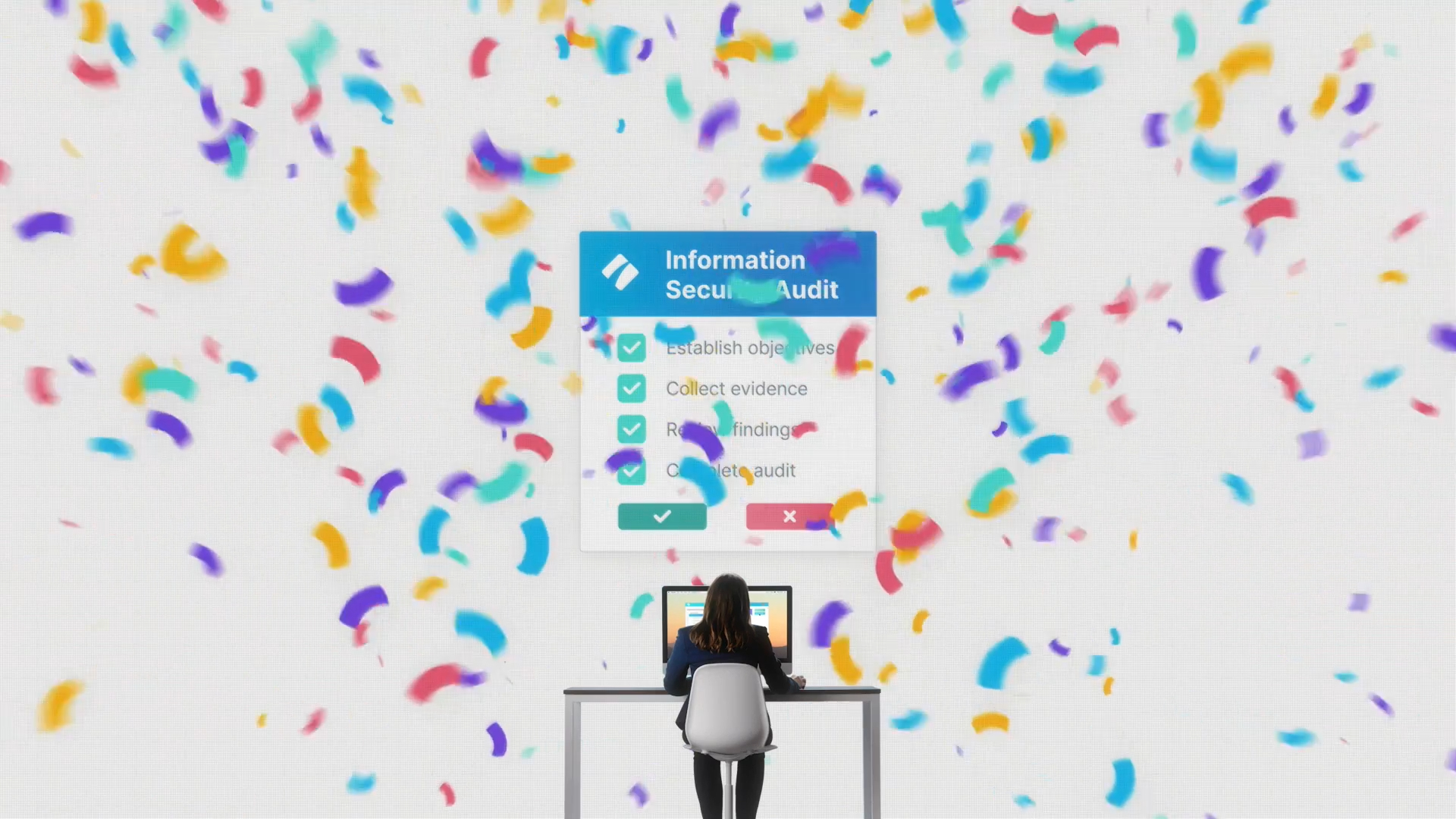
Action (The Pivot): The client confirmed they had a library of high-quality, branded live-action footage. The Advids strategy team immediately proposed a "Conceptual Pivot": We would re-board the entire video as a hybrid-media piece. This was a more complex production, but it was the right solution. It allowed us to use the live-action to set the scene (a real person at a desk) and then use our motion graphics to show what they were doing on the platform.
(Timestamp: 21s) A perfect example of the hybrid strategy: Advids' 2D user interface animation composited seamlessly over the client-sourced live-action background.
Phase 3: Building the Digital Brand: Vector Illustration and Asset Creation
Goal: To re-create the entire Process Street platform as flexible, animatable vector assets.
Process: A standard screen recording of the software would be low-resolution, difficult to animate, and visually cluttered. To achieve the clean, premium look the client wanted, our illustrators meticulously re-created every button, checklist, form, and diagram from the Process Street user interface.
Action: Using the client's brand guidelines, we created a comprehensive library (UI_Assets.ai) of all on-screen elements. This "Vector Illustration" process gave us full control over every color, line, and shape. It ensured that when the dashboard (at 00:03) flies into frame, it's perfectly crisp, on-brand, and ready to be animated.
(IMG ASSET 1)
(Timestamp: 3s) The main dashboard, re-created as a clean vector asset by Advids, forms the foundation of the video's visual language.
Phase 4: Keyframe and Motion: Breathing Life into the User Interface
Goal: To make the user interface animations feel fluid, intuitive, and "satisfying."
Process: This is where the Advids Clarity & Engagement Framework truly shined. It wasn't enough for a checklist to simply "appear." It had to animate in a way that felt responsive. Our motion designers used detailed Keyframe Animation, paying close attention to the easing and interpolation of every moving part.
Action: For the checklist animation (00:07), each checkmark was given a subtle "pop" and "overshoot," making the action feel tactile and rewarding. This focus on "motion language" transforms a simple UI element into a core part of the storytelling.
(IMG ASSET 2)
(Timestamp: 7s) This "satisfying" checkmark animation is a result of meticulous Keyframe Animation and motion design, making the software feel responsive.
Feedback Loop: Finding the 'Feel' of the Animation
Context: Reviewing the first animation test (Animatic_V2_with_live_plates.mp4).
Client: "We've reviewed the animatic on Vimeo Review. The timing is good, but the user interface pop-ups feel a bit... abrupt. Can we make them smoother?"
Advids: "Absolutely. That's a simple fix in the Keyframe Animation stage. We'll adjust the easing on the motion curves—less 'snap,' more of a 'swoosh.' We want it to feel fluid and responsive, not jarring. You'll see this refinement in the next version."
Feedback Loop: Clarifying the Workflow Diagram
Context: Reviewing the complex workflow diagram animation (seen at 00:10-00:12).
Client: "This diagram is the centerpiece. It looks great, but the 'Information Security Audit' path feels a bit secondary. Can we emphasize it more?"
Advids: "Great feedback. We can definitely adjust the hierarchy. We'll use a slightly brighter color and a subtle 'pulse' effect on that specific path to draw the viewer's eye, without breaking the harmony of the whole diagram. This will ensure the visual flow matches the script's emphasis."
(IMG ASSET 3)
(Timestamp: 11s) This complex workflow diagram required careful animation by Advids to ensure it was visually impressive yet easy to follow.
Synergy Analysis: Technology vs. Human Expertise
This project was a perfect marriage of animation technology and human-centric creative strategy.
Technology-Powered Contributions:
- Vector Illustration Software: Allowed for the pixel-perfect, scalable re-creation of the client's digital product.
- 2D Animation Suite: Enabled the complex Keyframe Animation, compositing, and motion tracking needed to blend the 2D elements with the live-action plates.
- Vimeo Review (Collaboration Tool): Provided a centralized platform for frame-specific feedback, which was essential for refining the animation's timing and feel.
Advids’ Visualization Craft (Human Expertise):
- The "Conceptual Pivot": The human-led strategic decision to move to a hybrid-media model. This insight, which came from Advids analyzing the client's core need (human connection) rather than just their request (animation), defined the project's success.
- Brand-Aligned Motion Language: Our animators' expertise in motion design theory (easing, interpolation) is what made the software feel "satisfying," a quality that technology alone cannot create.
- Seamless Integration: The technical skill to composite 2D elements into live-action footage—matching lighting, color, and perspective—is a high-level craft that requires experienced artists.
Outcomes & Strategic Learnings
A Clear, Compelling Product Story: The final video successfully demystified a complex software platform. It provided a clear, concise, and visually engaging explanation of Process Street's value, striking the perfect balance between human context and product detail.
A High-Value, Reusable Asset: The hybrid model was not only creatively successful but also highly efficient. By leveraging the client's existing footage, the project remained focused. Furthermore, the vector assets (the UI elements and diagrams) created by Advids are now a reusable library for the client to use in future marketing materials.
The Power of the Hybrid Model: This project was a powerful case study in the "Conceptual Pivot." It proved that for abstract digital products, grounding the animation in a human, live-action context can dramatically increase its relatability and impact. The key is having a production partner like Advids with the strategic vision and technical expertise to propose and perfectly execute such a hybrid approach.
Final Video
Author & Editor Bio