
Summary
This case study details the production of a 2D motion graphics explainer video for TRIMIT, a comprehensive software solution for the furniture industry built on Microsoft Dynamics 365 Business Central. The primary challenge was to communicate a complex, multi-faceted platform—covering everything from product configuration to finance—in a simple and engaging way. Advids employed The Advids Clarity & Engagement Framework to distill this complexity. The project's success hinged on a key "Conceptual Pivot" in the visual strategy, moving from a simple feature list to a dynamic "ecosystem" visual metaphor that instantly clarified the product's integrated value.
The Challenge
TRIMIT's software is an all-in-one solution. It handles product configuration, sales, logistics, manufacturing, finance, and more. The client's challenge was a classic case of "how to explain everything at once." A simple list of features would be overwhelming and fail to communicate the platform's main benefit: seamless integration. They needed a video that could, in under 90 seconds, make a complex Business-to-Business platform feel intuitive, unified, and powerful.
The Solution
Advids developed a high-impact 2D motion graphics video that transformed TRIMIT's complex architecture into simple, powerful visual metaphors. By focusing on information design first and animation second, we created a narrative that guides the viewer from the individual business challenges to the unified platform solution. This approach allowed us to clearly explain the software's core, its internal functions, and its external-facing portals without causing confusion.
Client Profile
TRIMIT is a leading software provider for the furniture, fashion, and configuration-heavy industries. Their solution is an add-on for Microsoft Dynamics 365 Business Central, designed to handle the specific, complex needs of these verticals, from manufacturing to omnichannel sales.
Project Objective
To create a concise and visually engaging explainer video that clearly communicates the comprehensive, integrated nature of the TRIMIT software solution. The video needed to serve as a high-level introduction for potential clients, partners, and stakeholders.
The Advids Clarity & Engagement Framework
For this project, Advids utilized its specialized workflow for 2D motion graphics, which prioritizes clarity and message retention.
- 1. Strategic Scripting: Distilling complex technical concepts into a clear, benefit-driven narrative.
- 2. Visual Strategy & Information Design: Developing visual metaphors (like diagrams and icons) to make the abstract tangible.
- 3. Brand-Aligned Asset Creation: Creating a complete library of custom Vector Illustrations that adhere to the client's modern, clean aesthetic.
- 4. Fluid Motion Design: Using Keyframe Animation with precise easing to create seamless transitions that connect disparate concepts into a single, flowing story.
Project at a Glance
| Feature | Detail |
|---|---|
| Client | TRIMIT |
| Agency Partner | Advids |
| Project | 2D Motion Graphics Explainer Video |
| Video Type | 2D Motion Graphics/Explainer |
| Estimated Duration | 6 Weeks |
| Core Technologies | Vector Illustration Software, 2D Animation Suite, Audio Editing Software |
| Collaboration Stack | Slack (Real-time Communication), Google Drive (Asset Management), Vimeo Review (Video Feedback) |
| Final Deliverables | 1:30 Explainer Video, Icon Asset Library |
Project Timeline
- 1. Kickoff & Scripting (Week 1)
- Milestone: Strategic alignment and script finalization.
- Key Outputs: Script_V2_Approved.docx.
- Quote: "The script needs to be simple. We must focus on the problem of disconnection before we introduce our integrated solution."
- 2. Visual Strategy & Storyboarding (Week 2)
- Milestone: Initial visual concepts presented.
- Key Outputs: Storyboard_Draft_A.pdf (the linear concept).
- 3. The Conceptual Pivot (Week 3)
- Milestone: Client feedback leads to a strategic pivot.
- Key Outputs: Storyboard_V2_Ecosystem_Concept.pdf (the new diagram) approved.
- Quote: "The 'ecosystem' diagram is perfect. That shows our value."
- 4. Asset Creation & Style Frames (Week 4)
- Milestone: Visual style locked.
- Key Outputs: Style_Frames_Set_B_V2.png approved by the client.
- 5. Animation & Motion Design (Week 5)
- Milestone: Full video animation complete.
- Key Outputs: Full_Animation_V2_Review.mp4 sent for feedback.
- 6. Sound Design & Final Mastering (Week 6)
- Milestone: Final audio mix, sound effects, and delivery.
- Key Outputs: Final video files delivered.
The Production Deep Dive: Engineering Clarity for a Complex Platform
Phase 1: Scripting and Visual Strategy: The Quest for a Core Metaphor
Goal: To translate TRIMIT's complex software platform into a simple, compelling story.
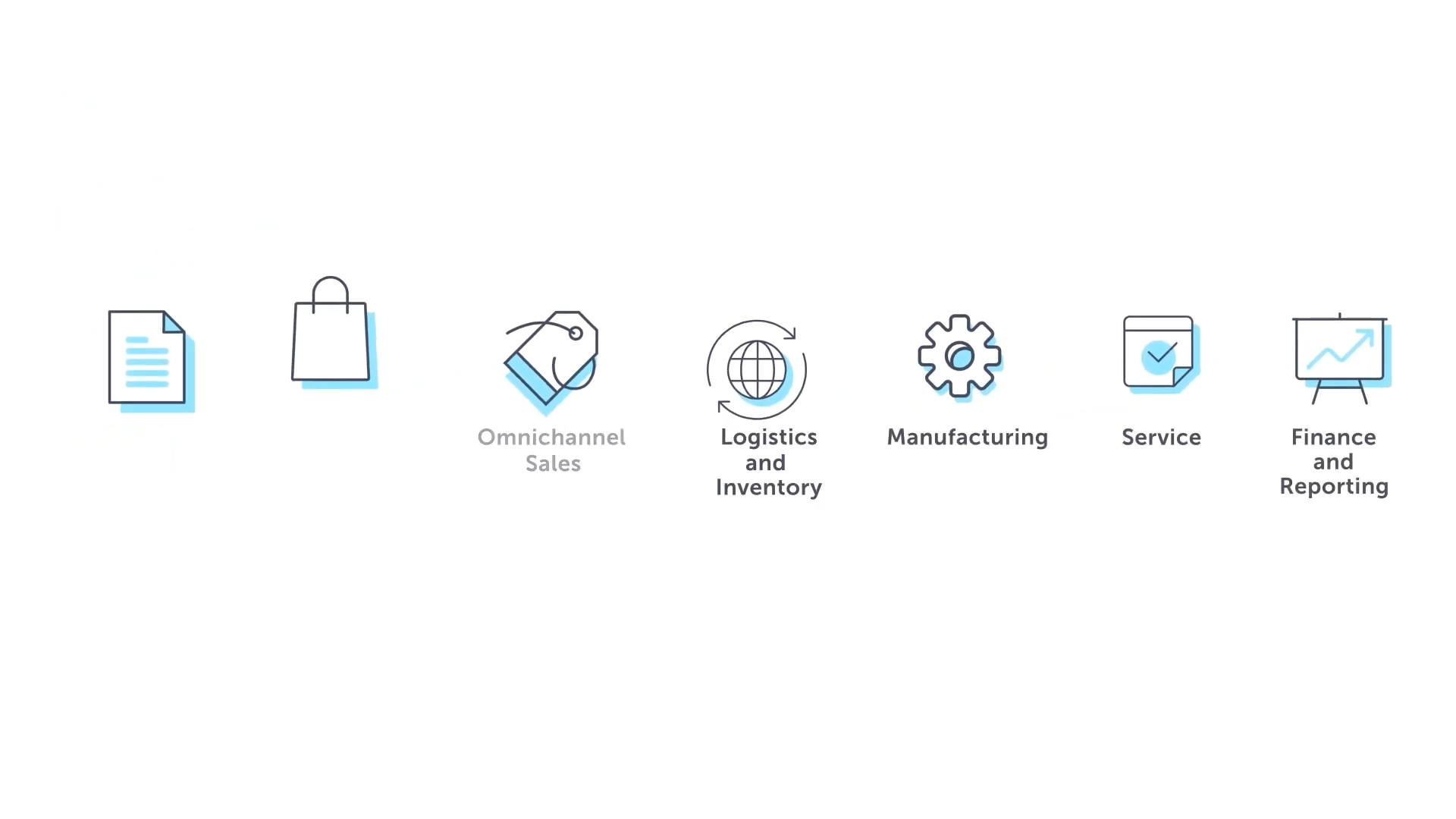
Process: The project began with intensive scripting and strategy sessions. The client's platform covers at least eight distinct business areas, including complex topics like "Omnichannel Sales" and "Finance and Reporting." A key challenge identified by the Advids strategy team was that simply listing these features (as seen at 00:07) would be confusing and fail to communicate the product's true value.
(IMG ASSET 2)
(Timestamp: 07s) The initial "list of features" visual, which presented the communication challenge: how to show these are connected, not separate.
Action: We developed a script that focused on the problem of disconnection first, then introduced TRIMIT as the singular solution. This set the stage for a visual challenge: how do we show this integration? Our initial storyboard (Storyboard_Draft_A.pdf) laid out the features in a clean but linear fashion.
Phase 2: The Critical Juncture: The "Ecosystem" Pivot
Goal: To create a single, powerful visual that explains TRIMIT's "all-in-one" value proposition instantly.
Process: The initial storyboard, while clean, was met with a critical piece of feedback.
Feedback Loop: Solving the Integration Puzzle
- Client: "We've reviewed Storyboard_Draft_A.pdf. The visual style is great, but presenting the functions as a list makes them feel like separate apps. Our entire value is that they are one platform. How can we show this?"
- Advids: "This is excellent feedback and confirms our main strategic challenge. A linear approach doesn't work. We propose pivoting to a new visual metaphor: an 'ecosystem' diagram. We'll place TRIMIT at the center and show all the functions and portals orbiting it, visually connected. This will immediately communicate integration."
Action: This "Conceptual Pivot" was the project's turning point. The Advids information design team created the circular diagram (Storyboard_V2_Ecosystem_Concept.pdf) that became the video's centerpiece. This single visual solution (seen at 00:13) solved the core communication problem and became the visual anchor for the rest of the video.
(IMG ASSET 3)
(Timestamp: 13s) The final "Ecosystem" diagram—the result of the Critical Juncture—which visually connects all of TRIMIT's functions into one integrated platform.
Phase 3: Vector Illustration and Brand Cohesion
Goal: To develop a clean, modern, and professional visual style that aligns with the TRIMIT and Microsoft brands.
Process: With the core metaphors locked, our illustration team began creating the full library of vector assets. This included the character, the icons for each business function, and the conceptual diagrams. The style had to be minimalist but not simplistic, conveying professionalism and high-tech competency.
(IMG ASSET 1)
(Timestamp: 03s) The opening scene, establishing the video's clean 2D vector style, color palette, and professional character.
Action: We used the client's specific color palette (blue, orange, green) to categorize information, creating a subconscious visual language for the viewer. All assets were optimized for smooth animation.
Feedback Loop: Aligning the Vector Aesthetic
- Advids: "Here are the initial style frames (Style_Frames_Set_B_V2.png) showing the character, icons, and the new ecosystem diagram. We've used the brand palette to define the different elements."
- Client: "This looks sharp. We approve this style. Let's ensure the character remains abstract and professional, and that the blue is always used for the core platform concepts. This is great."
Phase 4: Motion Design: Connecting the Dots
Goal: To animate the assets in a way that feels fluid, logical, and reinforces the theme of integration.
Process: The final stage was Keyframe Animation and Motion Design. For a video about software, the transitions are as important as the scenes themselves. They are the "verbs" that connect the "nouns." The Advids animation team focused on creating seamless, logical transitions that would guide the viewer's eye.
Action: We used motion to explain relationships. For example, the stacked blocks diagram (00:23) animates in from the bottom up to show that Microsoft Dynamics is the foundation for TRIMIT. In the ecosystem diagram, the elements animate in a circular flow, reinforcing the idea of a continuous, connected process. Precise easing on all Keyframe Animation ensured the motion felt modern, smooth, and never jarring.
(Timestamp: 23s) The "stacked blocks" metaphor, another example of information design, where motion (animating from the bottom up) reinforces the platform's architecture.
Synergy Analysis: Technology vs. Human Expertise
This project demonstrates the balance between 2D animation technology and the human expertise required for effective communication.
- Technology-Powered Contributions:
- Vector Illustration Software: Allowed for the creation of crisp, scalable assets that are lightweight and animate cleanly.
- 2D Animation Suite: Enabled complex Keyframe Animation, allowing us to animate character movements, icon transformations, and intricate diagram builds.
- Vimeo Review (Collaboration Stack): Provided a platform for frame-specific client feedback, which was essential for iterating on the complex ecosystem diagram.
- Advids’ Visualization Craft (Human Expertise):
- Information Design: The technology can animate anything, but what to animate is a human skill. The "Conceptual Pivot" to the ecosystem diagram was a strategic, human-driven solution to a communication problem.
- Strategic Scripting: Distilling a complex Business-to-Business product into a 90-second, benefit-focused script requires deep marketing and communication expertise.
- Motion Theory: Knowing how to use easing and interpolation to create a feeling of professionalism and flow is an artistic skill. This fluid motion is what makes the video engaging and not just a "moving slideshow."
Outcomes & Strategic Learnings
1. A Powerful, Reusable Sales Tool
TRIMIT received a concise and powerful video that instantly explains their unique value proposition. The video is a primary asset on their website and is used by their sales team to open conversations with a clear, shared understanding of the product.
2. The "Conceptual Pivot" is Key
This project reaffirmed a core Advids principle: for explainer videos, visual strategy is more important than animation quality. The project's success was determined in Week 3, not Week 5. By being willing to pause and solve the core conceptual problem (the "list of features"), we ensured the final product was not just beautiful, but effective.
3. Visual Metaphors Create "Sticky" Messaging
The "Ecosystem Diagram" and "Stacked Blocks" are powerful, "sticky" visual metaphors. They are far more memorable than a bulleted list of features. The client's audience can now recall these simple visuals and, by extension, TRIMIT's integrated architecture. This demonstrates how Advids transforms complex ideas into unforgettable visual stories.
Final Video
Author & Editor Bio

